myMix – Personal Monitor Mixer basic unit

myMix – Personal Monitor Mixer basic unit

myMix – BASIC UNIT

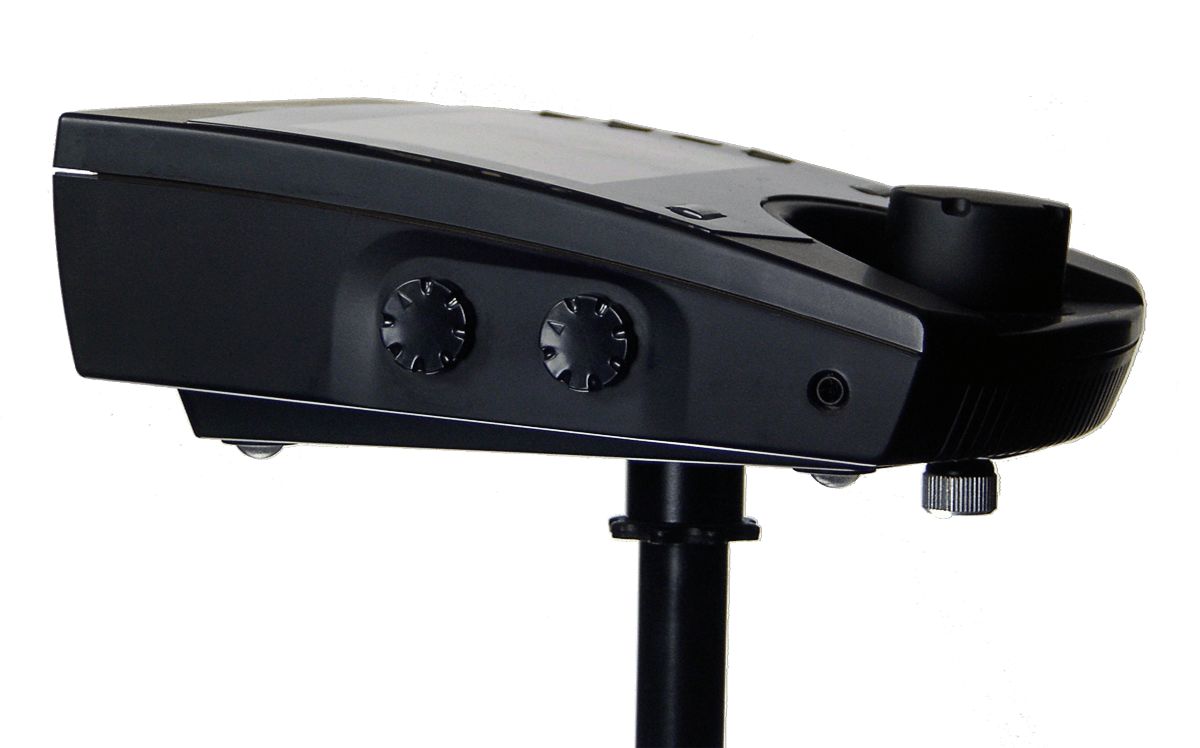
The myMix personal monitor mixer is the main building block for any myMix system. It can be used stand alone, or connected to an Ethernet switch as a system with up to 250 devices.

The user can select from all available audio channels in the network and create an individual stereo mix for headphones, in-ear monitors and (powered) speakers.

Each myMix can create a stereo mix using the internal stereo FX, tone control and panning selecting up to 16 from up to 500 network channels and put this signal to headphones or in/ears, drive power speakers or transmitters for wireless IEMs. This stereo mix can be also be sent back to the network, for others to listen to a mix, or use it as submix within myMix.

The local inputs are for microphone (XLR) or line level (1/4″ TRS) sources; phantom power is available. The channels to select for the mix can be from an IEX16 input expander, other local myMix inputs , other stereo mixes, or the tracks from SD cards in Playback mode.

With a single press of the RECORD button the selected audio channels get recorded in multi-track as 24-bit, 48kHz broadcast wav files. These files can be used with any DAW software or played back and remixed (virtual sound check). In Play Along Mode the two local inputs can be mix with the recorded tracks- a powerful tool to turn a practice at home into a full band rehearsal.

Features

  • Impeccable audio quality with 24-bit, 48 kHz throughout the system
  • Create a stereo mix using up to 16 from 500* audio channels
  • Intuitive User Interface with meaningful channel names
  • Volume, Tone Control, Effect Send, Pan, solo and Mute per channel
  • 7 integrated stereo effects to create a 3-D sound image
  • Autosave of all chages applied to the mix, with 20 profiles available.
  • 2 local network inputs (mic/line level) with phantom power
  • Multi-track recording (16 +2) on SD cards (24-bit wav-files)
  • Auto saving in up to 20 profiles
  • 4-band fully parametric master EQ
  • Send Mix to Network to listen to other devices or create submixes
  • Outputs for balanced line levels and headphones
  • Ships with microphone stand adapter and power-supply

For use in recording studios the myMix Studio-Mod with a modified silent cooling system is available.

* A myMix system can feature up to 500 audio channels (250 pairs) maximum.
Similar myMix Products

MIX PACK 4

MIX PACK 4

A starter package with everything needed to provide individual mixes and multi-track recording for 4 or even 7 musicians. All devices get connected with a network cable to the POE switch.

read more
MIX PACK 5

MIX PACK 5

A starter package with everything needed to provide individual stereo mixes and multi-track recording for 4 vocalists and 7 musicians with 26 audio channels to select from.
read more

IEX-16L

IEX-16L

IEX-16L

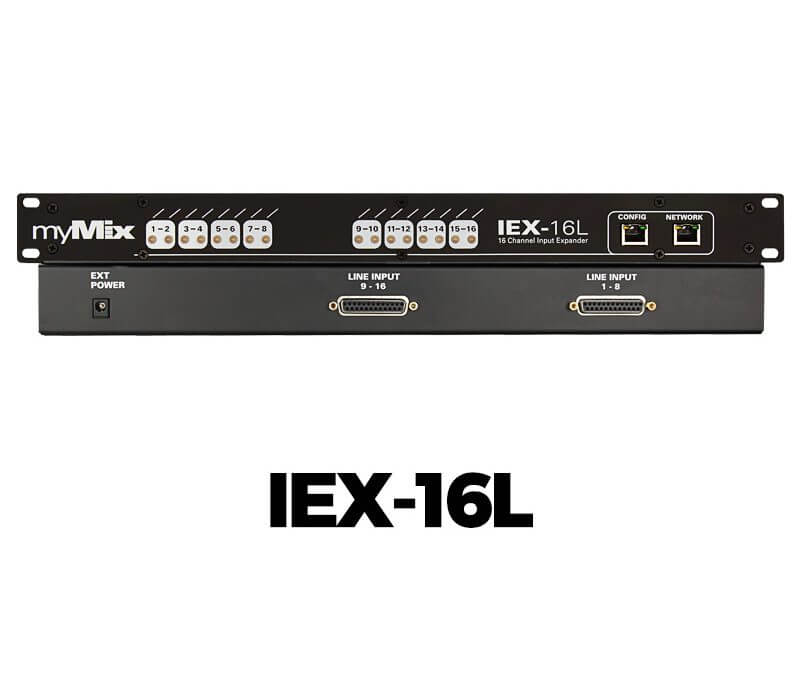
myMix 16 channel input expander for line level signals.
16 channel input expander for line level signals. Expands a myMix system by 16 audio channels.*

Includes power supply (identical to myMix). 1RU. Multiple IEX16L-A can be used on a system for up to 500 audio channels in total (using a managed switch). For digital inputs please see IEX16L-A.

Features

  • DB25 connectors for line level signals (“Tascam” pin out)
  • Save input configuration with channel mode, names and input gain settings
  • Can be locked through CONFIG port
  • Large dual color LEDS for signal present and clip

* A myMix system can feature up to 500 audio channels (250 pairs) maximum.

Other myMix Products

MIX PACK 4

MIX PACK 4

A starter package with everything needed to provide individual mixes and multi-track recording for 4 or even 7 musicians. All devices get connected with a network cable to the POE switch.

read more
MIX PACK 5

MIX PACK 5

A starter package with everything needed to provide individual stereo mixes and multi-track recording for 4 vocalists and 7 musicians with 26 audio channels to select from.
read more

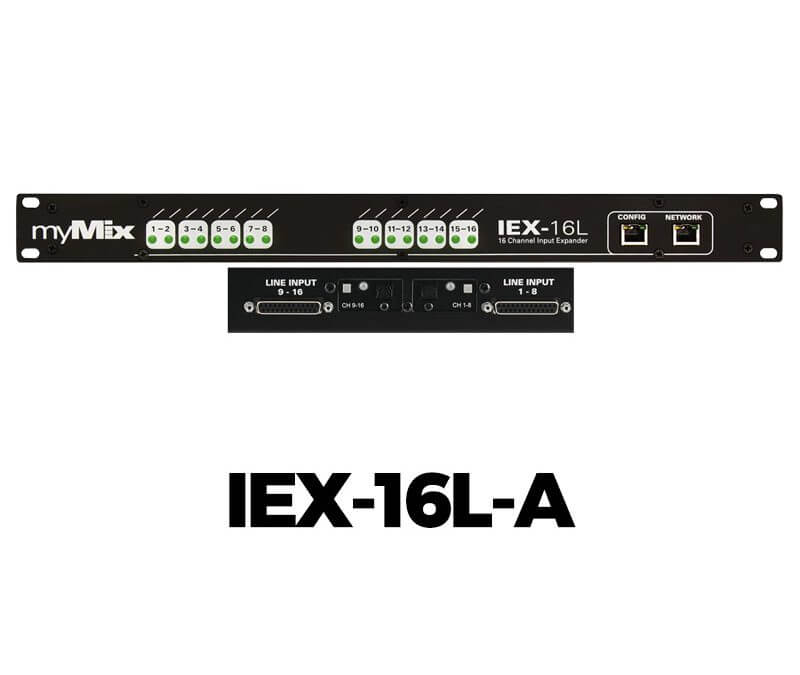
IEX-16L-A

IEX-16L-A

IEX-16L-A

16 channel input expander for digital and analogue signals, expands the myMix network by 16 audio channels.

T16 channel input expander for line level signals. Expands a myMix system by 16 audio channels.*

Includes power supply (identical to myMix). 1RU. Multiple IEX16L-A can be used on a system for up to 500 audio channels in total (using a managed switch). If you want to use signals from a DANTE or MADI network, please see the DANTE or MADI interface options.

Features

  • DB25 connectors for line level signals (2 x 8)
  • Digital inputs in ADAT format (Toslink, 2 x 8)
  • Switchable in groups of 8 channels
  • Save input configuration with channel mode, names and input gain settings
  • Can be locked through CONFIG port
  • Large dual color LEDS for signal present and clip

* A myMix system can feature up to 500 audio channels (250 pairs) maximum.

Other myMix Products

MIX PACK 4

MIX PACK 4

A starter package with everything needed to provide individual mixes and multi-track recording for 4 or even 7 musicians. All devices get connected with a network cable to the POE switch.

read more
MIX PACK 5

MIX PACK 5

A starter package with everything needed to provide individual stereo mixes and multi-track recording for 4 vocalists and 7 musicians with 26 audio channels to select from.

read more

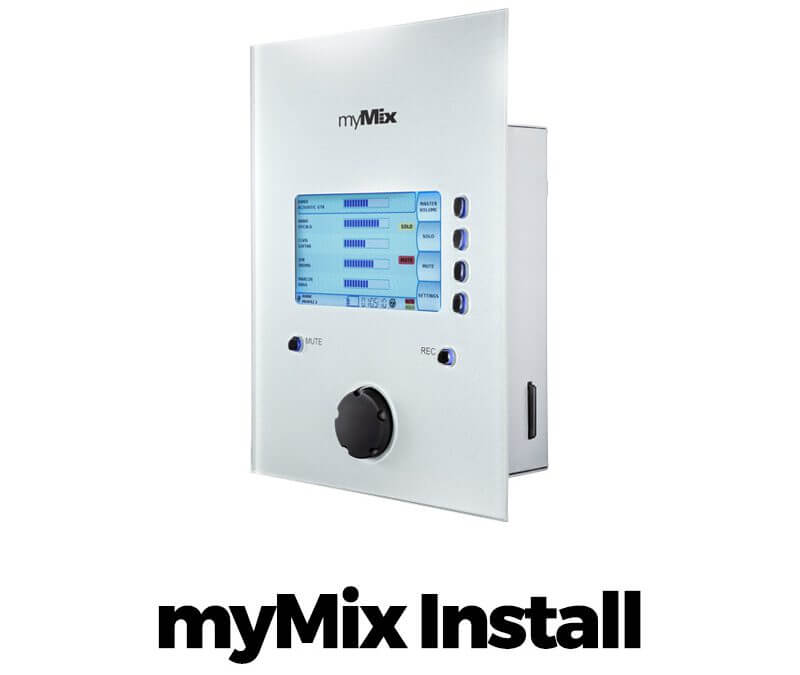
myMix Install

myMix Install

myMix Install

Get high-quality audio in your building wherever you need it.

Get high-quality audio in your building wherever you need it The myMix Install version is the solution where style and functionality in a surface mount housing are required.

The patented user interface of myMix is very intuitive and designed to be operated by both technical engineers as well as non-audio engineers. Adjusting audio levels is easy for anyone to do because of the personally named channels and simple control layout. Each myMix has local memory to store settings, a central remote control, for configuring, editing, and individual parameter locking for the supporting technicians is available through myMix CONTROL web browser application.

Features

  • Same functionality as the portable myMix
  • Two local audio network inputs (mic/line)
  • Stereo line level out for the mix signal
  • Elegant front panel for flush mount installation
  • Audio connections on Phoenix connector (included)
  • Optional wall mount box (see below)

Optional Wall-mount box

Install connector

Other myMix Products

MIX PACK 4

MIX PACK 4

A starter package with everything needed to provide individual mixes and multi-track recording for 4 or even 7 musicians. All devices get connected with a network cable to the POE switch.

read more
MIX PACK 5

MIX PACK 5

A starter package with everything needed to provide individual stereo mixes and multi-track recording for 4 vocalists and 7 musicians with 26 audio channels to select from.
read more

myMix Control

myMix Control

myMix Control

myMixCONTROL is a web-based remote tool for engineers working with larger myMix systems.

Overview Brochure

PDF 1.8 MB

Download the latest Version

myMix Control 1.68 XL and myMix Project Editor

Version 1.68XL of the Web Control Interface is fully compatible with all myMix devices on firmware 1.68. Project files created with the older 1.68 are fully compatible. 1.68XL features the new look of myMix with some UX enhancements. The manual is now also included on the myMix Control plug – so if you need anything, all user instructions are right in the ZIP package.

T he myMixCONTROL is a tool for engineers working with larger myMix systems, or the system integrator to set-up dedicated myMix systems that require special settings and function locking. The myMix CONTROL software is a web browser interface located on the myMix PLUG computer. It can be accessed from any device that runs a web browser through a Wi-Fi or LAN connection. The myMix PLUG hosts web server, transfers the data between the computer/tablet and the myMix devices and has local memory to save complete projects and other data.

If you like to get more information check out the introduction video for myMix Control or the webinar myMix Control.

myMix CONTROL completes the system by giving the engineer the capability to back up a whole system, configure and edit individual units, or lock specific functions through any device that accesses the network wired or wireless.

The myMix personal monitor mixing system has convinced thousands of musicians and sound engineers that they do not need to make compromises anymore with their sound. From small to large stages in concert venues or HoW, in studios, rehearsal rooms, music schools and theaters, myMix helps anywhere music is made. The sound quality and the easy to use, intuitive user interface to control one’s own monitor mix is what our users love most – along with the multi-track recording and playback capability.

The channels in a myMix system can be named as wished. Mixing gets as simple as selecting the instrument or vocal mic, pressing the button and adjusting: volume, tweaking the tone, adding stereo eects and
pan control for a 3-D sound image. Changes get automatically stored in the current prole or a mix can be shared with others, as well as
many other features.

Features

  • For mix outputs from myMix System (to feed wireless IEM transmitters) or internal submixes
  • Access from any device with a web browser (computer, tablet, smart phone)
    Save change over time by saving and loading entire projects with all device data
  • Help musicians by remotely editing or copying mixes
  • Internal WiFi access point or access through LAN connection
  • Built-in memory for hundreds of projects

Everything under control. Under myMix Control.

T he myMix Control can show all myMix devices in the current project. The page is showing the status (online/offline) and name of every unit, it allows to copy profiles from single units and mutes them. It finally can open all units for remote editing. The page refreshes the data automatically from the network when opened.

Mix Editor

The myMix Control can show all myMix devices in the current project. The page is showing the status (online/offline) and name of every unit, it allows to copy profiles from single units and mutes them. It finally can open all units for remote editing. The page refreshes the data automatically from the network when opened.

Profile Editor

While not visible on the myMix device itself – each profile stores up to 128 channels it sees on the network. In the editor, channels can be selected and deleted.

myMix Project Editor

The myMix project editor is a tool that lets you exchange the MAC address of myMix devices incl. IEX16 input expanders in existing project files.

Why would you need the Project Editor?

The entire myMix system is fully decentralized and dynamic. Every audio channel contains a device label and the channel label you provided – however under the hood, the data used to make unique connections is based on the MAC address of each device.
The settings data for each myMix is saved automatically, and the data you save as a project on myMix Control uses MAC addresses as a unique identifier.

If you changed a piece of hardware that is sending audio channels to the myMix network – for instance, exchanging the IEX-16 input expander – these 16 input channels would show up as “new channels” to all myMix units in the system. Input channel names and assignments were not transferred to the new unit, because the project file keeps this data linked to the original unit’s MAC address.

The myMix Project Editor allows you to open a myMix project that you stored on a USB or hard disk, change the MAC address to match your new hardware and save it. Once you load that edited project to your myMix Control, all myMix devices will now “see” the new channels with the same settings as stored before.

Tutorial Videos

Watch Video

Introduction myMix Control

Watch Video

Webinar myMix Control

Other myMix Products

MIX PACK 4

MIX PACK 4

A starter package with everything needed to provide individual mixes and multi-track recording for 4 or even 7 musicians. All devices get connected with a network cable to the POE switch.

read more
MIX PACK 5

MIX PACK 5

A starter package with everything needed to provide individual stereo mixes and multi-track recording for 4 vocalists and 7 musicians with 26 audio channels to select from.

read more

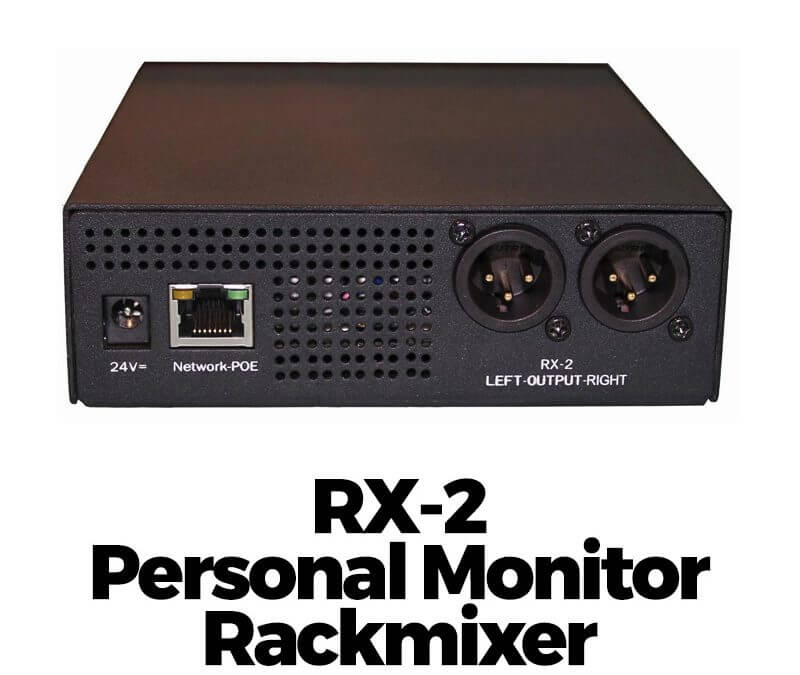
RX-2 Personal Monitor Rackmixer

RX-2 Personal Monitor Rackmixer

RX-2 Personal Monitor Rackmixer

Rack-mountable remote controlled networked mixer for the myMix system

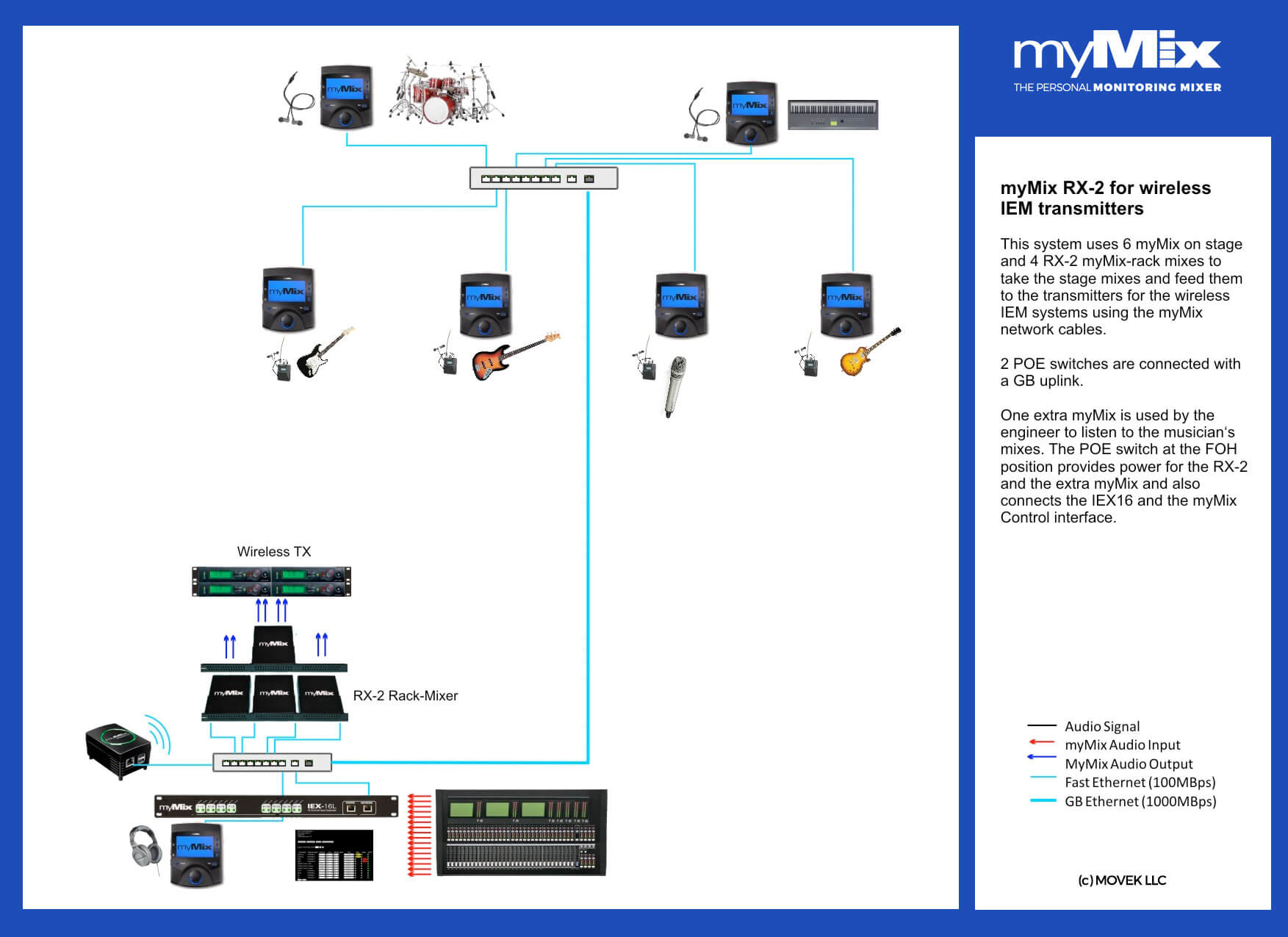
The RX-2 comes in a solid metal housing (1U) and is designed to be operated by the myMix Control web browser based interface.The RX-2 has the same mixing capabilities as a standard myMix: it can select up to 16 audio channels from the network and create a stereo mix, controlling volume, pan, tone control and stereo effects per channel.

The myMix network can manage up to 500 audio channels* which can consist of local inputs from myMix mixers, analogue or digital inputs to IEX16 input expanders, or stereo mixes from myMix mixers.The RX-2 is ideal for transporting a mix that is created on a myMix in one place via the network to another location, e.g. a musician on stage is creating a stereo mix and is sending that mix to the network. The RX-2 selects that mix signal and can add some extra channels like talkback or intercom from other sources; the output is then fed to a wireless transmitter for in-ear monitors. The optional RX-RM rack-mount kit allows to fit three RX-2 devices in 1U rack space.

Features

  • For mix outputs from myMix System (to feed wireless IEM transmitters) or internal submixes
  • High quality, low latency Audio Over IP on CAT5
  • Two balance line level outouts (XLR)
  • myMix CONTROL web browser for configuration
  • Metal housing with rack mount option
  • Optional 19″ rack-mount kit – holds 3 x RX-2 in 1U
  • Fully compatible with all myMix devices

* A myMix system can feature up to 500 audio channels (250 pairs) maximum.

Other myMix Products

MIX PACK 4

MIX PACK 4

A starter package with everything needed to provide individual mixes and multi-track recording for 4 or even 7 musicians. All devices get connected with a network cable to the POE switch.

read more
MIX PACK 5

MIX PACK 5

A starter package with everything needed to provide individual stereo mixes and multi-track recording for 4 vocalists and 7 musicians with 26 audio channels to select from.

read more